


FREETeam & Cloud coming soon

One sermon.A week ofclips.

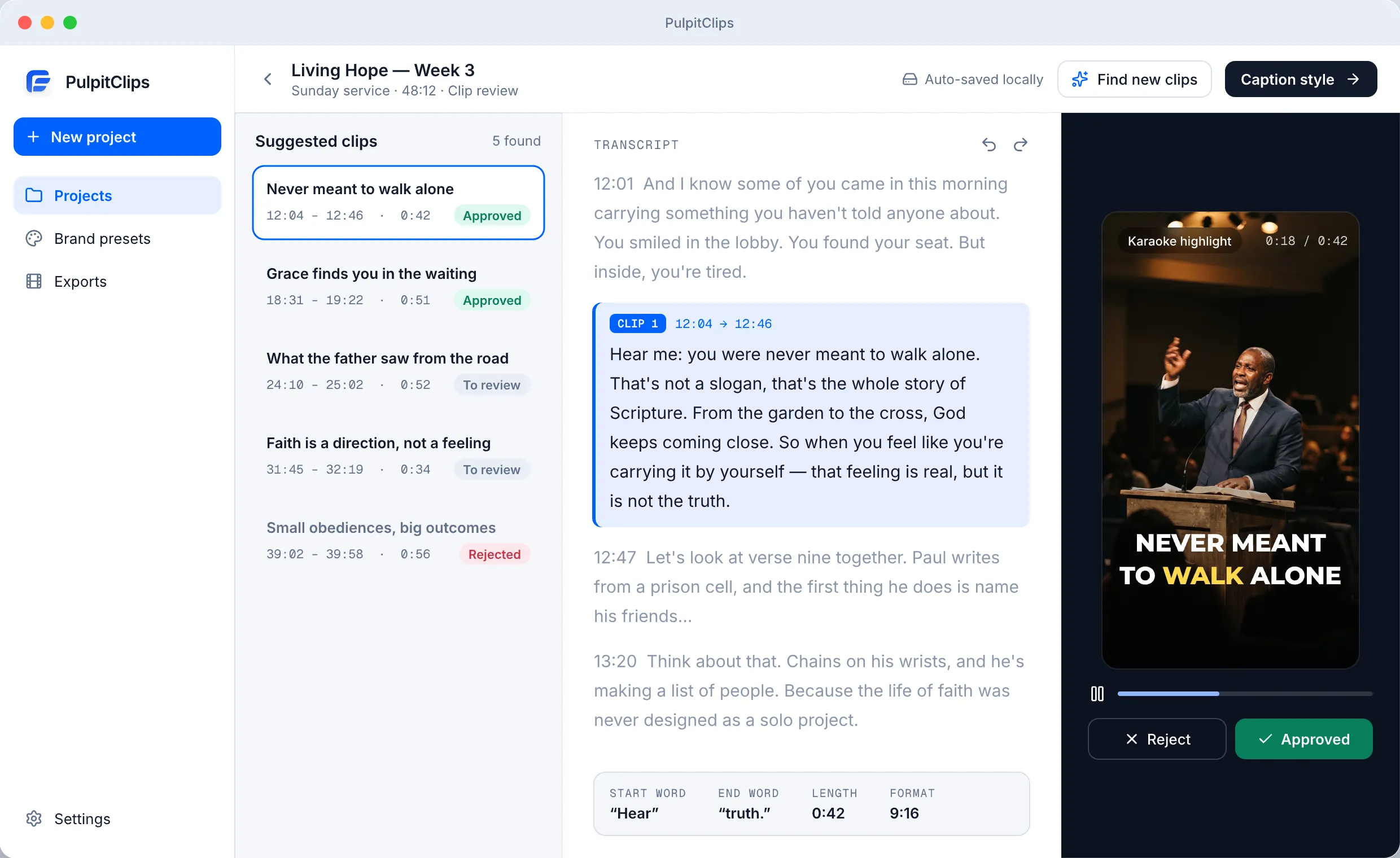
A desktop app for church media teams. It transcribes your sermon, suggests the strongest moments, and renders captioned clips in your church's style — you approve every one.

Free · macOS · Uses your own AI provider keys

How it works

A whole service in. The moments worth sharing out.

You leave with clips you've watched, trimmed, and approved.

0:0024:0048:12
  1. 01

    Import the recording

    Drop in an MP4 or MOV of your service. Everything is saved in a project folder on your computer.

  2. 02

    Transcribe & suggest

    Get suggested moments with titles and exact time ranges. Choose clip length and how many to find.

  3. 03

    Review & trim by word

    Set start and end on exact transcript words. Approve or reject every suggestion.

  4. 04

    Style & export

    Apply your brand preset and render approved clips into the project's exports folder.

Caption styles

Captions in your church's voice.

Five caption templates, tuned with your font, colors, size, position, and logo. Save it once as a brand preset.

Formats & lengths

Shaped for every feed.

Export vertical, portrait, square, widescreen, or the original frame — then upload wherever your people are.

  • 9:16

    Reels, Shorts, TikTok

  • 4:5

    Instagram & Facebook feed

  • 1:1

    Square feed posts

  • 16:9

    YouTube and websites

CLIP LENGTH

  • Auto
  • <30s
  • 30–60s
  • 60–90s
  • 90s–3m
  • 3–5m
  • 5–10m
  • 10–15m

PulpitClips renders video files. It doesn't connect to or post on your social accounts.

Local-first

Your projects stay on your desk.

Your source video, projects, and finished clips are files on your own computer.

  • Projects live on your computer

    Each sermon is a local project folder with its own exports folder.

  • Your own provider keys

    Audio goes to Deepgram for transcription and the transcript to OpenAI or Anthropic for suggestions — with keys you add.

  • Keys encrypted on this device

    The app only shows whether a key is configured, never the key.

  • A person approves every clip

    Only approved clips are rendered. Nothing is published for you.

  • Lock studio settings

    Protect AI rules and studio settings with a PIN.

Pricing

Free today. Built for teams next.

PulpitClips Desktop

Available now

Freeto download

  • Local sermon projects on your Mac
  • AI clip suggestions with titles and descriptions
  • Word-accurate trimming and approve / reject review
  • Five caption templates and saved brand presets
  • Export to 9:16, 4:5, 1:1, 16:9, or original
  • Uses your own Deepgram and OpenAI or Anthropic keys
Download for macOS

Team & Cloud

Coming soon

Soonpricing to be announced

  • Team collaboration on the same sermon projects
  • Cloud storage for recordings, projects, and clips
  • Details and pricing shared with the waitlist first

Get an email when it opens

Provider usage is billed by those providers under your own accounts.

FAQ

Straight answers.

Is PulpitClips really free?

Yes. The desktop app is free to download and use. It relies on AI providers you connect with your own keys, and those providers bill you directly for what you use.

What do I need to get started?

A Mac, a sermon recording as an MP4 or MOV file, FFmpeg, a Deepgram key for transcription, and an OpenAI or Anthropic key for clip suggestions. The app checks your setup and shows how to install anything missing.

Does it post to Instagram, TikTok, or YouTube for me?

No. PulpitClips exports video files to your computer. You upload them yourself.

Do I need an account?

Not for the desktop app. Your projects and settings stay on your computer.

Is Windows supported?

PulpitClips is available for macOS today. We'll announce other platforms when they're ready.

Is PulpitClips open source?

No. It is proprietary software. It's free to use, but its source code is not public.

What's coming with Team & Cloud?

Team collaboration and cloud storage for sermon projects. Join the waitlist to hear when there's more to share.

Let Sunday's message travel all week.

Download PulpitClips for free and turn this week's sermon into clips worth sharing.